
How to Use BulkSMS Ghana: A Complete Guide for Beginners
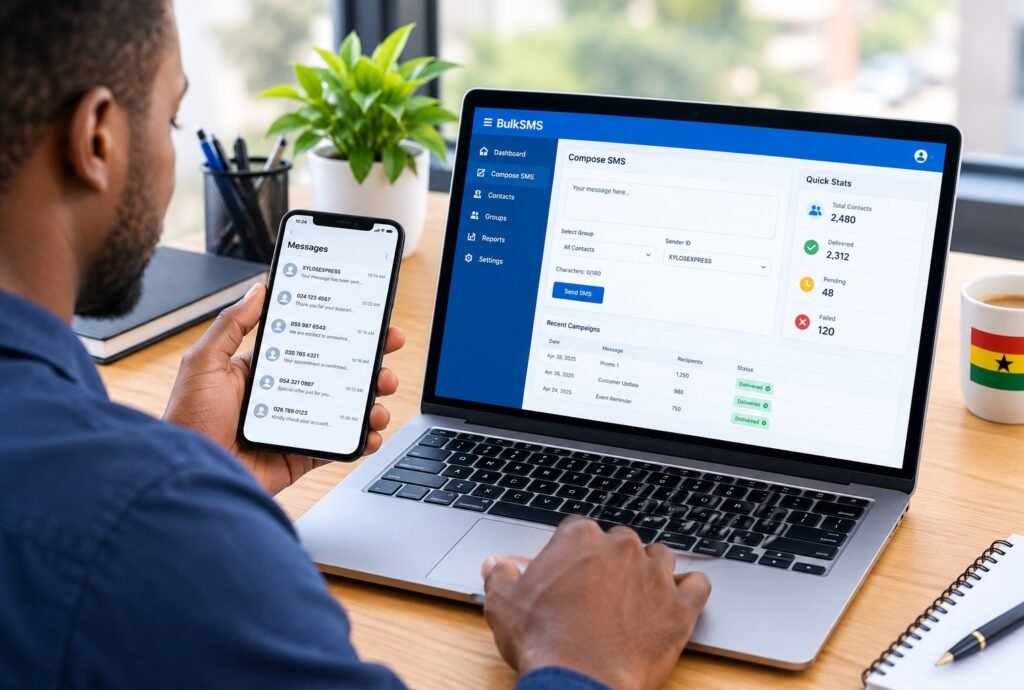
Sending the same message to dozens or hundreds of people individually can be time-consuming. Bulk SMS provides a faster way to communicate with customers, clients, members, employees, event attendees, and other groups from one platform.
For individuals, businesses, and organizations in Ghana, BulkSMS Ghana provides a platform for sending SMS messages to multiple contacts at once.
If you are new to bulk messaging, this guide explains how to get started, prepare your contacts, top up your account, create a Sender ID, and send your first SMS campaign.
What Is BulkSMS Ghana?
BulkSMS Ghana is an SMS messaging service that allows users to send messages to multiple mobile numbers through a web-based dashboard.
Instead of opening your phone’s messaging app and sending the same message repeatedly, you can upload or enter a list of contacts and send a campaign to them from one place.
Bulk SMS can be useful for:
- Business promotions
- Customer updates
- Event invitations and reminders
- Community announcements
- Organisation and membership communication
- Campaign and outreach messages
- Service notifications
- School and institutional communication
How to Create a BulkSMS Ghana Account
The first step is to create an account on the BulkSMS Ghana client platform.
Visit the BulkSMS Ghana registration page and provide your basic information, including your name, phone number, email address, and password. The registration page also requires users to agree to the platform’s terms of service and privacy policy.
After creating your account, you can sign in to the client dashboard using your registered phone number and password.
How to Top Up Your BulkSMS Ghana Balance
Before sending a bulk SMS campaign, you need sufficient credit in your account.
After logging into the dashboard, look for the Wallet, Balance, Top Up, Fund Account or similar option. The exact wording and available payment options may depend on the current version of the platform.
Select the appropriate top-up option and follow the instructions provided to add credit to your account.
It is a good idea to check your available balance before launching a campaign, particularly when you are sending to a large contact list.
How to Prepare Contacts for Bulk SMS
One of the most important steps is preparing your contact list correctly.
You can organise your contacts using Microsoft Excel or another spreadsheet application before importing them into the BulkSMS dashboard.
A simple contact list could contain:
| Name | Phone Number |
|---|---|
| John Mensah | 0241234567 |
| Ama Boateng | 0551234567 |
| Kofi Addo | 0201234567 |
Make sure the phone numbers are correctly entered and that there are no unnecessary spaces, symbols, or characters.
Remove Duplicate Contacts
Before importing your list, check for duplicate phone numbers.
Duplicate contacts can cause the same person to receive your message more than once, which is particularly important when sending a promotional or campaign message.
Excel’s Remove Duplicates function can help clean a large contact list quickly.
Check Ghana Phone Numbers
For Ghanaian contacts, check that each number has the correct Ghanaian mobile format. For example: 0241234567
If the BulkSMS platform requires international formatting, the same number may need to be entered as 233241234567
Always follow the number format specified by the BulkSMS Ghana dashboard when importing your contacts.
How to Import Contacts into BulkSMS Ghana
Once your contact list is ready, log in to your BulkSMS Ghana account.
Look for the Contacts, Address Book, Contact Groups, or Import Contacts section.
Depending on the dashboard version, you may be able to upload a CSV or spreadsheet-compatible contact file.
Before uploading:
- Clean the contact list.
- Remove duplicate numbers.
- Check the phone number format.
- Save the spreadsheet in the format the platform requests.
- Upload the file.
- Map the appropriate columns, such as Name and Phone Number, if the dashboard asks you to.
- Add the contacts to an existing group or create a new contact group.
After importing, review the contact group to confirm that the numbers were successfully added.
How to Create a Contact Group
Contact groups make it easier to manage different audiences.
For example, you could create groups such as:
- Customers
- Staff
- Event Attendees
- Students
- Members
- Business Contacts
- Campaign Contacts
Organizing contacts into groups means you can select a specific audience when preparing future SMS campaigns instead of uploading the same list repeatedly.
How to Create a Sender ID
A Sender ID is the name that can appear as the sender of an SMS instead of a standard phone number, subject to the applicable network and service requirements.
For example, a business could use its brand name as its Sender ID.
When creating one, keep the name short and recognizable. Avoid using a Sender ID that could mislead recipients about who sent the message.
If you are setting up a Sender ID for an organization, campaign, or business, allow time for any required approval before your first campaign.
How to Write an Effective Bulk SMS
A successful bulk SMS message should be short, clear, and immediately understandable.
Include the most important information first. A useful structure is who you are → what you are communicating. → What the recipient should do
For example:
XyloseXpress: New opportunities, stories, and updates are now available. Visit our website to read more and stay connected.
Avoid unnecessarily long introductions. Recipients should understand the message’s purpose within the first few seconds.
Check Your SMS Character Count
SMS messages have character limits. A message that exceeds the standard SMS length may be divided into multiple SMS segments, which can affect the number of SMS units deducted from your account.
For this reason, keep campaign messages concise.
Before sending a large campaign, check the message length and the estimated number of SMS units that will be used.
How to Send a Bulk SMS Campaign
Once your contacts, account balance, and message are ready, you can prepare your campaign.
The general process is:
Log in → Select SMS/Messaging → Choose your contact group → Enter your message → Select your Sender ID → Review → Send
Before clicking the final send button, carefully check the following:
- Sender ID
- Message content
- Contact group
- Number of recipients
- Spelling and grammar
- Links
- Dates and times
- Campaign cost or SMS units
A small spelling error in a message sent to hundreds of people can be difficult to correct, so always send a test message first when the platform allows it.
How to Check Your SMS Delivery Status
After sending a campaign, check the dashboard for the campaign or message report.
Depending on the platform’s current reporting features, you may be able to see information about messages that were delivered, failed, or remain pending.
Delivery reports can help you identify problems with incorrect numbers, unavailable recipients, or other delivery issues.
Common Bulk SMS Mistakes to Avoid
Sending Without Testing
Always test an important message before sending it to your entire contact list.
Uploading Duplicate Numbers
Clean your contact list before importing it. Duplicate numbers can result in repeated messages.
Using the Wrong Number Format
Check whether the dashboard requires local Ghanaian numbers or an international format.
Writing an Overly Long Message
Long messages can be split into multiple SMS segments. Keep the message concise where possible.
Forgetting Your Sender ID
Make sure recipients can easily identify who sent the message.
Sending to the Wrong Contact Group
Double-check your selected audience before sending, particularly when you manage several groups.
Ignoring Consent and Privacy
Only send messages to people who have a legitimate reason to receive your communication. For promotional messaging, make sure your practices comply with applicable Ghanaian requirements and provide an appropriate way for recipients to stop receiving marketing messages where required.
Is Bulk SMS Useful for Businesses?
Bulk SMS can be particularly useful when information needs to reach many people quickly.
A business can use it to announce promotions, remind customers about appointments, notify clients about changes, invite people to events, or share important updates.
The effectiveness of an SMS campaign depends not only on the platform but also on the quality of the contact list, relevance of the message, the timing and clarity of the call to action.
Final Tips for Your First Bulk SMS Campaign
If this is your first campaign, start with a small test group.
Check that the Sender ID appears correctly, confirm that the message is formatted properly, and verify that recipients receive it as expected.
Once everything looks correct, you can proceed with the larger contact group.
BulkSMS Ghana can make mass communication considerably easier when your contacts are well organized and your message is concise. The key is to treat bulk SMS as a communication tool, not just as a way to send the same message to as many numbers as possible.
Always review your recipient list, message, and campaign settings before sending.
About The Author